Quick answer: The UVQ G14 supports Android WiFi real-time image transmission. In our real test, an Android phone connected directly to the G14 WiFi network, received the live device image, and displayed controls for snapshot, recording, album review, and video functions.
This article is based on real test images rather than a generic feature description. The photos show the actual WiFi connection process, the image seen through the UVQ G14, and the live image displayed on an Android phone.
How Does the UVQ G14 WiFi Connection Work?
The UVQ G14 can create a local WiFi connection that an Android phone can join.
In our real test, the phone’s WLAN screen detected the device network as a camera access point. After connecting, the Android phone could communicate directly with the UVQ G14.
This type of connection is useful because it allows the image from the device to be viewed on a separate mobile screen.
What Does the Real UVQ G14 WiFi Test Show?
The three real test images show the complete basic process:
- The Android phone detects and connects to the G14 WiFi network.
- The UVQ G14 displays the low-light scene through the device.
- The phone receives and displays the same scene through the Android application.
This gives buyers a clearer understanding of what “WiFi real-time image transmission” actually means in practice.
Step 1: Connect the Android Phone to the G14 WiFi Network
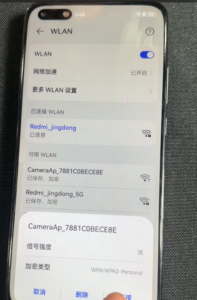
The first step is to open the WLAN settings on the Android phone.
In our test image, the phone detected a local camera WiFi network beginning with “CameraAp”.
After the phone connects to this network, the mobile device can communicate with the G14.
For dealers and distributors, this is useful because the connection process can be demonstrated directly to customers instead of only being explained in a specification sheet.
Step 2: Confirm the Image on the UVQ G14
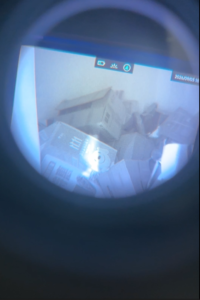
The second real image shows the scene being viewed through the UVQ G14.
This is important because it provides a reference for comparing what the user sees in the device with what appears on the connected phone.
During a product demonstration, buyers can use this comparison to check:
- Image content
- Scene framing
- Low-light visibility
- Live image response
- Whether the mobile display is receiving the same scene
Step 3: View the Live Image on the Android Phone
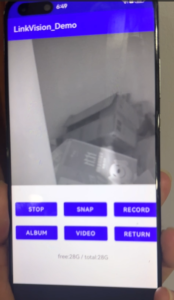
The third test image shows the Android phone displaying the live image from the UVQ G14.
In this test, the application interface displayed several controls, including:
- STOP
- SNAP
- RECORD
- ALBUM
- VIDEO
- RETURN
This makes the WiFi function more useful than simple remote viewing.
The UVQ G14 also supports video recording and image capture, which can be used together with the Android WiFi live-view function during testing and demonstrations.
The phone can also serve as a demonstration screen, allowing another person to see what the device is viewing.
Why Android WiFi Matters for Dealer Demonstrations
Digital night vision is difficult to explain only with words.
If only one person can look through the eyepiece, a dealer may need to pass the device from person to person.
With Android WiFi image transmission, the image can be shown on a mobile screen while another person uses the device.
This can help with:
- Customer demonstrations
- 经销商培训
- Sample testing
- Product comparison
- Low-light image review
- Sales presentations
Can the UVQ G14 Take Snapshots Through the App?
The real Android interface shown in our test includes a SNAP control.
This provides a convenient way to capture still images during a live WiFi demonstration.
For dealers and B2B buyers, snapshots can be useful for:
- Documenting test results
- Comparing different low-light scenes
- Preparing customer presentations
- Reviewing image output with a team
Can the UVQ G14 Record Through the App?
The test interface also includes a RECORD control.
This makes it possible to use the Android connection as part of a product demonstration and recording workflow.
For buyers, this can help document:
- Outdoor low-light tests
- IR on and IR off comparisons
- Movement and scanning
- Dealer demonstrations
- Sample evaluations
Is UVQ G14 WiFi Compatible With iPhone?
The current UVQ G14 WiFi workflow is designed for Android devices.
Buyers should therefore prepare a compatible Android phone when testing or demonstrating the WiFi function.
We recommend explaining this clearly before purchase so that customers understand the current mobile compatibility.
Why We Publish Real WiFi Test Images
“WiFi support” is easy to list as a product feature.
Real connection images are more useful because they show what the feature actually looks like during use.
These real test photos show:
- The Android WLAN connection screen
- The device image seen through the G14
- The same scene displayed on the phone
- The available mobile control interface
For UVQ, this is part of a broader approach based on real product photos, real tests, and clear specifications.
UVQ G14 WiFi Test Summary
| Test Item | Real Test Result |
| Mobile platform | Android |
| Connection method | Local WiFi / WLAN connection |
| Live image viewing | 已支持 |
| Snapshot control | Available in tested interface |
| Recording control | Available in tested interface |
| Dealer demonstration | Suitable for live image sharing |
Frequently Asked Questions About UVQ G14 WiFi
Does the UVQ G14 support Android WiFi?
Yes. The UVQ G14 supports Android WiFi real-time image transmission.
Can the image be displayed on an Android phone?
Yes. In our real test, the phone connected to the G14 WiFi network and displayed the live device image.
Can dealers use the WiFi function for demonstrations?
Yes. The phone can act as a secondary viewing screen, which is useful for customer demonstrations, training, and sample evaluation.
Does the Android interface support snapshot and recording controls?
Yes. The tested interface shown in our real images includes SNAP and RECORD controls.
Does the current UVQ G14 WiFi workflow support iPhone?
The current workflow is designed for Android devices. Buyers should use a compatible Android phone for WiFi testing and demonstrations.
Final Answer
The real UVQ G14 WiFi test shows a complete Android connection workflow: the phone connects to the G14 local WiFi network, the device displays the low-light scene, and the same image is transmitted to the Android phone in real time.
The tested mobile interface also provides snapshot, recording, album, and video controls.
For dealers and B2B buyers, this makes Android WiFi more than a specification. It becomes a practical tool for product demonstration, sample testing, training, and customer communication.
A transmission test is only useful alongside the workflow it supports. This compatibility note covers the requirements, the overview covers the use cases, and recording and image capture covers the output. The device tested is the UVQ G14 with Android WiFi.
 English
  Chinese
  Spanish